AI receptionists: the complete UK guide (2026)
What an AI receptionist is, what it costs, and how it compares with voicemail, answering services and hiring. With UK law, a cost calculator, templates and set-up steps.
Simon
· 23 min read
The short answer
- What it is: software that answers your calls and messages in a natural voice, 24/7, and does the receptionist's job: answers questions, books, looks up orders and jobs, handles complaints.
- What it needs: the same access your receptionist has. Knowledge for the answers, and connections to your diary and systems through an API or MCP for the actions.
- Who it suits: any business that misses calls while working, after hours or at busy times, or wants every call handled the same way.
- UK cost: most AI receptionists start at about £37 to £49 a month, then 15p to 37p a minute. With Line, the AI receptionist is included on the £19 Pro plan, or added to the £4 Starter plan as a paid add-on, and answered calls cost 2p a minute. A full-time receptionist costs about £28,400 a year. Try the cost calculator.
- The law: UK law does not require you to say it is an AI, but the CMA says label it and the EU requires it for EU callers. Say it in the greeting.
- Set-up: an afternoon. Facts, systems, rules, greeting, 20 test calls, then forwarding. Templates for each step are below.
Every small business has the same phone problem. The calls come when you are busy, on a job, with a customer, or closed. Voicemail catches few of them. A receptionist costs a salary. An AI receptionist is the newest answer, and in 2026 it is good enough that most UK owners should at least try one.
This guide covers everything you need to decide and to set one up. It explains what an AI receptionist is and how it works. It shows what an AI receptionist can do once it has the right access, and how Line builds and routes receptionists. It compares it, honestly, with voicemail, phone menus, answering services and hiring. It shows the real UK costs and the law. And it gives you the tools: a finder, a cost calculator, a greeting generator, and more than 40 templates you can copy.
Line wrote this guide, and Line sells an AI receptionist. Every competitor price and every legal fact links to its source.
- A year to employ one full-time receptionist at the National Living Wage, with employer NI and pension. Before recruitment, cover and a desk.
- £28,389
- Line calculation from gov.uk 2026/27 rates
- Is what 75% of UK adults give a business before they give up calling. Answer the second call and you keep most of them.
- 3 tries
- BT Business / Censuswide, 2,000 UK adults, September 2026
- Of UK adults are comfortable with an AI answering their call when it can hand them to a person. 54% are when it says it is an AI at the start.
- 68%
- Moneypenny / Censuswide, 5,001 UK adults, January 2026
- Of worldwide turnover is the fine the CMA can impose for misleading consumers. It says you answer for your AI agent as you would for an employee.
- 10%
- CMA, Complying with consumer law when using AI agents (March 2026)
What is an AI receptionist?
An AI receptionist is software that answers a business's calls and messages in a natural voice, 24 hours a day, and does the receptionist's job. It understands what the caller wants and how they feel, answers questions, books appointments, looks up orders and jobs, updates records and deals with complaints. It works from the same information and systems a human receptionist uses, and it answers many calls at once, so no caller waits.
It is not three things it is often confused with:
- Not a phone menu. An auto attendant plays a recording and asks callers to press 1 or 2. It routes calls, but it cannot hold a conversation. See auto attendant vs AI receptionist.
- Not voicemail. Voicemail records a message and waits. An AI receptionist talks to the caller, asks the right questions, and can deal with the call there and then.
- Not a person. A virtual receptionist at an answering service is a real person in another office. In the UK that is what most people mean by "virtual receptionist", though some AI providers now use the term too. See AI vs virtual receptionist.
The same technology also answers texts, WhatsApp messages and website chat. On the phone, it is called an AI receptionist. In a messaging app, it is usually called an AI agent or assistant.
How does an AI receptionist work?
An AI-answered call goes through six stages. The whole loop, from the caller finishing a sentence to the AI starting its reply, takes about a second.
- Step 1
The call arrives
On the number your customers already use. Your phone line forwards calls to the receptionist: all of them, only after hours, or only when nobody picks up.
- Step 2
It answers at once
With your greeting, in under a second, and it says it is a virtual assistant. There is no queue and no hold music.
- Step 3
It listens
Speech recognition turns the caller's words into text as they speak, accents and background noise included.
- Step 4
It decides
A language model reads your knowledge and rules, and the caller's tone, then answers, looks something up in your systems, takes an action such as a booking, or hands over where you have asked it to.
- Step 5
It replies
A natural voice speaks the answer. If the caller interrupts, it stops and listens, the way a person would.
- Step 6
Everything is recorded
The transcript, the details captured and every action taken are logged, and anything you keep for a person reaches your team, marked urgent where it needs to be.
- Inbound call, answered by the AI receptionist19:05 · after hours
Hello, you're through to Hartley Plumbing. I'm the virtual assistant. How can I help?
Molly, AI receptionistMy radiator's cold at the top. Can someone look at it this week?
CallerThat usually means it needs bleeding, which we can do on a visit. What's your postcode?
Molly, AI receptionistCF10 1AB. Thursday morning would be best.
CallerThanks Tom. I've asked Dan to call you back first thing tomorrow to confirm Thursday.
Molly, AI receptionistMessage for Dan, logged with the transcript
Radiator cold at the top · CF10 1AB · prefers Thursday morning
Three ways to connect it to your phone
You do not need a new number. Your phone line sends calls to the AI receptionist using call forwarding. You choose when:
| Set-up | What happens | Good for |
|---|---|---|
| All calls | The AI answers every call first and passes some to your team | Busy lines, and owners who want every call dealt with the same way |
| After hours | Your team answers in opening hours; the AI answers when you are closed | A first step, and businesses with a front desk |
| No answer (overflow) | Your phone rings first; the AI answers after a set number of rings or when the line is busy | Sole traders and small teams who answer most calls themselves |
Most UK phone lines and mobiles support all three. On a mobile, the codes are set from the keypad. Our guide to forwarding calls to another phone has the codes for each UK network. You can also move your number to the AI provider's phone system, which keeps everything in one place.
What can an AI receptionist do?
Everything your receptionist does on the phone and in messages, once it can reach what your receptionist reaches. A receptionist is good at the job because they know the business and can see the diary, the customer list and the jobs board. Give an AI receptionist the same information and the same systems, and it can do the same work: answer the question, book the visit, check the order, sort out the complaint, and update the record.
The difference between an AI receptionist that only takes messages and one that runs the front desk is not intelligence. It is access.
| The receptionist's job | What a person uses | What the AI needs |
|---|---|---|
| Answer questions about services, prices and policies | Experience, the website, the price list | Your knowledge documents |
| Book, move and cancel appointments | The diary | A connection to your calendar or booking system |
| "Is my job still on for Thursday?" | The jobs board or order system | A lookup tool on that system |
| Recognise a returning customer | The customer list, past calls | Customer records and conversation history |
| Sort out a complaint | The complaints policy, a goodwill budget | The policy, the customer's record and a limit you set |
| Decide how urgent a call is | Experience and your rules | Your urgency rules and the job details |
| Take a deposit | A card machine or payment link | A payment-link tool |
| Update the records | The CRM or job system | Write access to that system |
| Tell the owner what happened | A note on the desk | The transcript, the details captured and every action logged |
It reads tone, not just words
Modern voice AI hears how something is said as well as what is said. It notices frustration, urgency, confusion and distress, and it changes its approach the way a good receptionist does: it slows down, acknowledges the problem, skips the script and gets to the point. An upset caller with a late delivery does not need a person because they are upset. They need someone who can see the order, explain what happened and put it right. An AI receptionist with access to the order can do exactly that.
Access is the whole job: APIs and MCP
There are three ways to give an AI receptionist what your receptionist knows and uses.
- Knowledge. Your services, prices, areas, policies and FAQs, as documents it reads before it answers. This covers most questions.
- Built-in connections. Calendars are the common one: Google and Microsoft calendars connect in a few clicks.
- APIs and MCP. Almost every business system, from CRMs and job-management software to booking, e-commerce and accounts, has an API: a way for other software to read and change its data. MCP, the Model Context Protocol, is an open standard built for exactly this: software publishes its actions as tools, and an AI agent uses them. Connect a system once, and the receptionist can look up a customer, check a job, or create a booking in it, during the call.
Set its limits as you would for a new starter
You would not give a new receptionist the authority to refund any amount on day one. Set the same limits for an AI receptionist, per action:
- Do it. Look up an order, check the diary, take a booking.
- Ask first. Issue a refund or confirm a booking, after a person approves it.
- Draft only. Write the reply or the change for a person to send.
- Not allowed. Leave the action switched off.
Hard limits, such as a maximum refund, belong in the system's rules, not only in the instructions. Some decisions you keep for a person because a regulator says so: clinical triage in a GP surgery needs clinical safety approval, and regulated legal or financial advice needs an authorised person. The CMA also expects a person to keep checking: it says to make sure there is "a human in the loop, actively checking that the AI agent is making correct decisions" (CMA, March 2026). These are rules about authority, not limits on what the AI can understand.
How Line builds AI receptionists
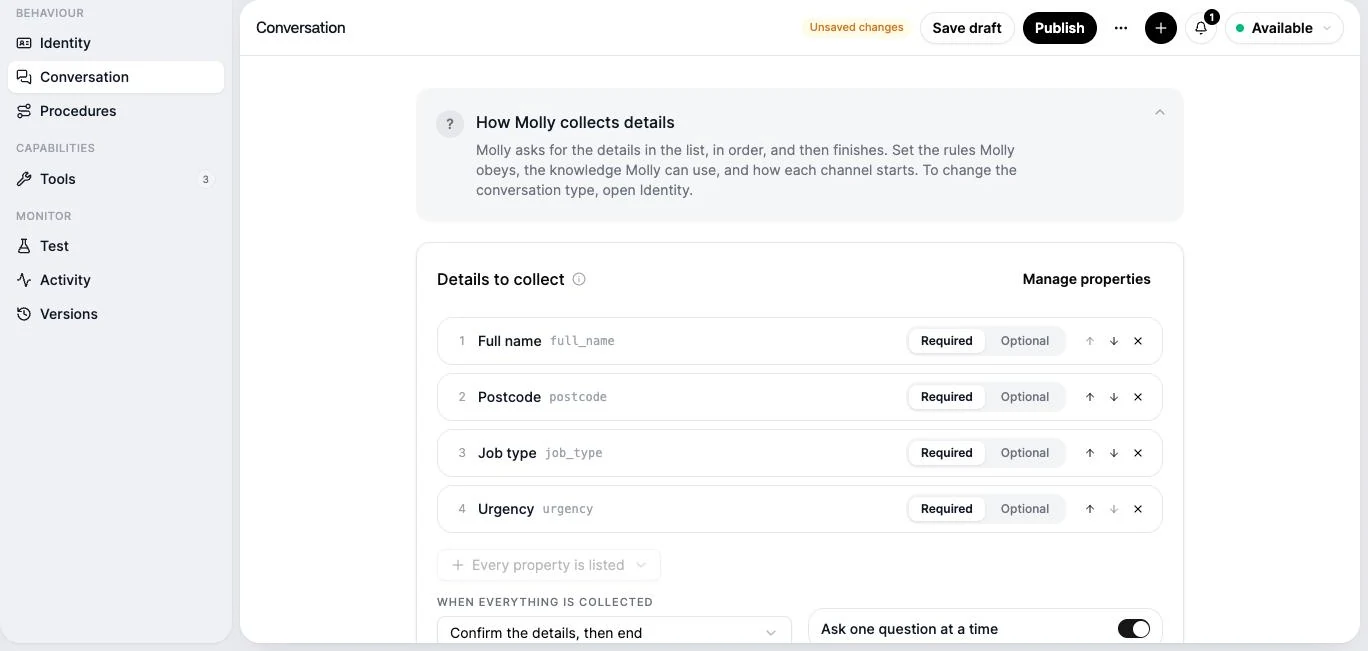
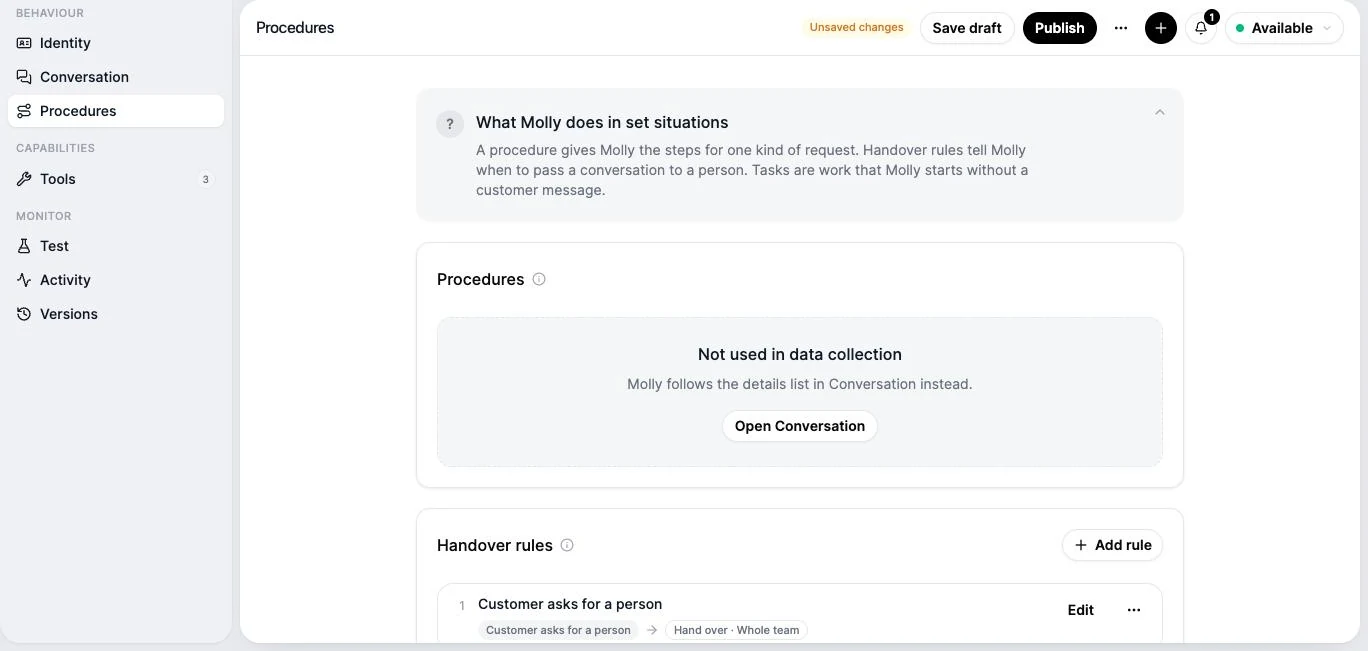
In Line, a receptionist is an agent you build in the agent creator. Start from Molly, the pre-built receptionist, or create a new agent, and build as many as your business needs: one for the main line, one for emergencies, one for bookings on WhatsApp. Each agent is set up in seven sections.
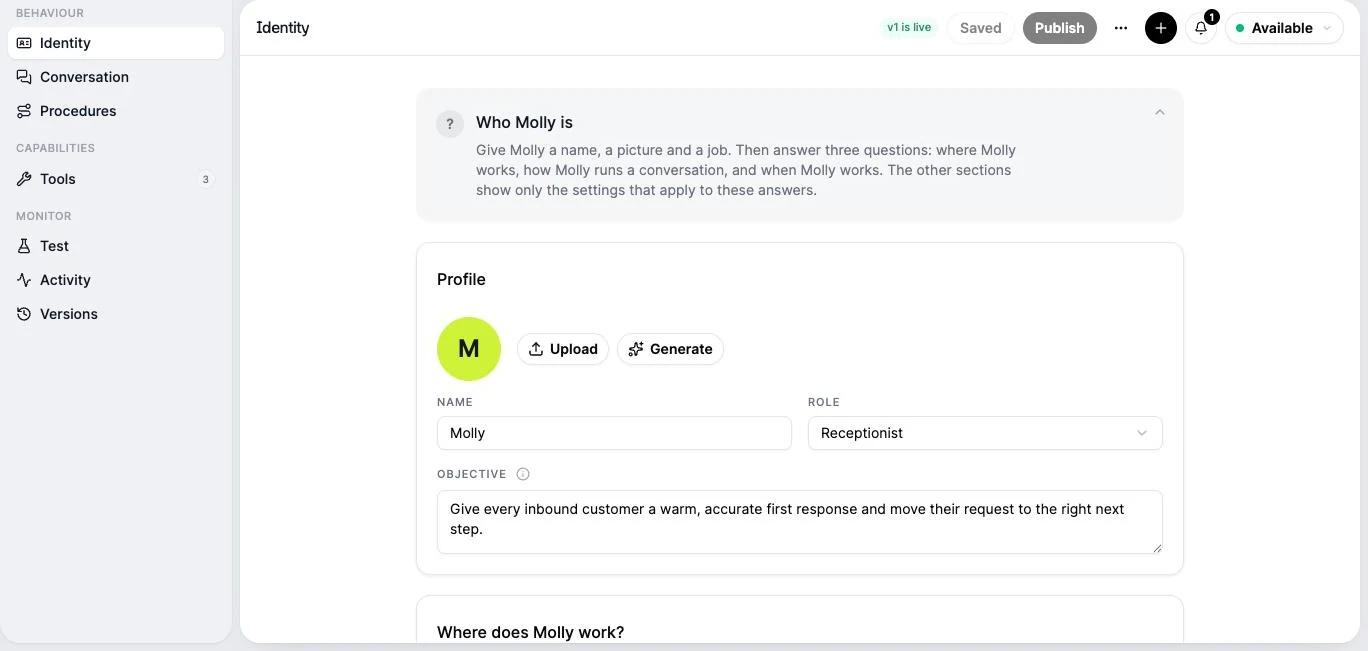
| Section | What you set |
|---|---|
| Identity | A name, a picture, a role and an objective. Then three questions that shape everything else: where it works (calls, texts, WhatsApp, web chat, email), how it runs a conversation (an open conversation, or a fixed list of details to collect), and when it works (when customers call or message, or on a schedule) |
| Conversation | Its goals, the details to capture, instructions, the knowledge it uses, what it knows about the customer, and the greeting and reply style for each channel |
| Procedures | Step-by-step procedures for set requests, handover rules for the moments you want a person, and tasks it runs without a customer message |
| Tools | Your calendars, any API or MCP server, and your published workflows, each set to Run, Ask first, Draft only or Off. Passwords and keys are stored encrypted and never shown to the AI |
| Test | A test chat on each channel, and the checks that must pass before you publish |
| Activity | The conversations it handled, each step and tool it used, and your review of the outcome |
| Versions | Every published version, so you can restore an earlier one |
Media slot · agent-tools · image
Web, /agents/[agentId]?section=tools on the agent-infrastructure build, 1200×750 at 2×. Show three tools: Google Calendar (Ask first for bookings), an MCP server for a job-management system (lookup tools on Run), and an HTTPS "Order status" GET tool (Run). One secret listed by name only. No secret values on screen.
Calls run on a realtime voice, or on a speech pipeline that can work in eight languages, from British English to French, German and Spanish.
Five receptionists you can build
The same creator builds very different receptionists. These are the shapes we see most:
- Front desk. An open conversation on your main number. Answers anything in its knowledge, books visits in your calendar, checks job status in your job system, and hands over complaints above its goodwill limit.
- Intake. A fixed list of details to collect: for example name, postcode, job type and urgency. It asks one question at a time, reads the details back, and finishes. Ideal for quote requests, new patients and emergency call-outs.
- Bookings. Connected to your calendar, set to book on its own or ask first. Works well on WhatsApp and web chat, where customers book at 11pm.
- Customer service. Connected to your order or account system through an API or MCP. Answers "where is my order?", changes a delivery, or raises a refund for you to approve.
- Owner's assistant. No customers at all. Runs tasks on a schedule or when something happens, such as reviewing yesterday's new leads every morning and reporting what needs a call back.
Route every call and message to the right receptionist
In Line, every number and channel has a workflow, and the workflow decides who handles what comes in. The Agent step in a workflow chooses which receptionist answers and how: Act, where it replies itself, or Draft, where it writes the reply for a person to check and send. Calls always run in Act. Opening hours, ring times and "nobody picked up" are steps in the same workflow.
| Where it comes in | Workflow | Receptionist |
|---|---|---|
| Main number | Ring the team for 20 seconds in opening hours, then the receptionist; the receptionist straight away after hours | Front desk |
| Emergency line (a second number) | Straight to the receptionist, day and night | Intake, with urgent handover to the engineer on call |
| Every message | Bookings | |
| Website chat | Every chat | Intake for quote requests |
| Every email | Customer service, in Draft mode for the first month |
Each receptionist keeps its own knowledge, tools and limits. You change one without touching the others, and you can see in Activity exactly what each one did.
Media slot · setup-out-of-hours-workflow · video
Landscape, silent, 25 to 30 seconds, MP4 under 6 MB, plus a PNG poster. Record on the agent-infrastructure build. /workflows → New workflow → template "Agent for After-Hour Calls" → Time Rule (Hours set) → In hours: Ring Members (20 s) → no answer: Agent (Molly, Act); Out of hours: Agent (Molly, Act) → Validate → Publish.
Media slot · agent-activity · image
Web, /agents/[agentId]?section=activity on the agent-infrastructure build, 1200×750 at 2×. One run open, showing the lookup tool call and its result, and the review marked Resolved. Made-up customer data only.
Your options for answering business calls
There are five ways to get a call answered, plus the mix most growing businesses end up with: an AI that answers first and a team behind it. Here they are side by side.
| Compare | Voicemail and a missed-call text | Auto attendant (phone menu) | AI receptionist | Human answering service | In-house receptionist |
|---|---|---|---|---|---|
| Cost (UK, ex VAT) | Free with most phone lines | Often included with a cloud phone system | Most providers: £37–£49 a month to start; 15–37p a minute afterLine: £19 a month on Pro, or an add-on on the £4 Starter plan; 2p a minute | 99p–£2.20 a call, or a bundle | £2,370–£2,860 a month |
| Hours | 24/7, records only | 24/7, routes only | 24/7 | Office hours; 24/7 costs more | Opening hours, less breaks and leave |
| Calls at once | Unlimited | Unlimited | Unlimited | Many | One |
| Answers questions | No | Recorded information only | Yes, from your knowledge and systems | From a script | Yes |
| Bookings | No | No | Yes, in your calendar | Often, with diary access | Yes |
| Acts in your systems | No | No | Yes, through APIs and MCP | Rarely: takes a message | Yes |
| Upset callers and complaints | No | No | Yes: hears tone, follows your policy, hands over at your limits | Yes, with a script | Yes |
| What the caller hears | A beep | A menu | A natural voice that says it is an assistant | A person using your business name | Your own staff |
| Time to set up | Minutes | An hour | An afternoon | A day or two | Weeks to hire |
| Main risk | Most callers hang up without a message | Callers get lost in the menu | It can only do what you give it access to | A message, but nothing done | Cost, and no cover when they are away |
Voicemail and a missed-call text
Voicemail is free and always on, but it is a weak safety net. In the most-quoted UK data, 69% of callers who reached a small business's voicemail hung up without a message (Moneypenny, 2016, a vendor study). Callers also screen unknown numbers: in 2026, 85% of UK consumers said they do not answer them (Hiya), so your call back may not get through either.
If you stay with voicemail, add an automatic missed-call text. It reaches the caller on the number they dialled, and many will reply to a text who would never leave a message. Our voicemail greeting templates cover every situation.
Auto attendant (phone menu)
A recorded menu that routes callers by key press. It is the right tool when callers want a particular person or team and someone is there to answer. It is the wrong tool when nobody is there: a menu that ends in voicemail is still voicemail. Read auto attendant vs AI receptionist.
Human answering service
Trained receptionists at another company answer in your business name, take a message and send it to you. Callers hear a person. But most services work from a script and a message pad: they cannot see your diary, your customers or your jobs, so they take a message rather than act on it. You pay per call, about 99p to £2.20 each on pay as you go, or a monthly bundle, and evening and weekend cover often costs more. Read phone answering services in the UK and Moneypenny alternatives.
In-house receptionist
Your own person on the phone and at the front desk. A good receptionist knows your customers and your systems, and is the only option that can greet a visitor in person. But one full-time person covers about 20% of the 8,760 hours in a year once holidays and sickness are taken out, answers one call at a time, and costs about £28,400 a year at the National Living Wage. Calls during their lunch, their holiday, another call, or after 5:30 still go to voicemail.
AI receptionist
Answers every call at once, day and night, for a monthly fee and a per-minute charge. With your knowledge and your systems connected, it does the whole job on the call: answers, books, checks, fixes and records. Without them it can only take messages, so the access you give it decides how much it does.
AI first, people behind it
The mix that works for most busy businesses. The AI answers every call and message first and does the work, and the team handles the decisions you keep for a person: approvals above a limit, regulated advice, and anyone who asks for a person. Your team spends its phone time where you want a person, not on the next "are you open Saturday?".
Which option fits your business?
Answer four questions. The advice uses the same comparison as the table above.
Answer all four questions to see which way of answering your calls fits best.
What does an AI receptionist cost in the UK?
AI receptionists sold in the UK use four pricing models: a flat monthly fee, a fee per call, a fee per minute, or an AI receptionist included with a business phone system. From most providers, the cheapest paid plans with AI answering cost about £37 to £49 a month, excluding VAT, and past a plan's included minutes most charge 15p to 37p a minute. A typical three-minute call therefore costs 45p to £1.11 to answer with AI, against 99p to £2.20 for a person at an answering service. With Line, the AI receptionist is included on the £19 Pro plan, or added to the £4 Starter plan as a paid add-on, and answered calls cost 2p a minute.
Enter your own numbers. The calculator shows the monthly cost of each option and how many of your calls each one actually answers.
- VoicemailAnswers 0 of 150 calls£0 /moFree, but no caller speaks to anyone.
- Full-time receptionistAnswers 92 of 150 calls£2,366–£2,865 /moOpening hours only, one call at a time, no cover for holidays or sickness.
- Human answering serviceAnswers 150 of 150 calls£149–£330 /moPer answered call. Out-of-hours cover can cost more.
- Other AI receptionistsAnswers 150 of 150 calls£68–£167 /moPlan fee or per-minute charge, whichever is higher.
- Line ProAnswers 150 of 150 calls£28 /moPlan with a UK number, team app and AI receptionist; calls billed per minute.
Receptionist cost is a full-time salary at the National Living Wage up to the ONS 75th percentile, with employer NI and pension, before recruitment. Answering service and AI ranges are published UK prices checked in October 2026. Line's price is read from the live pricing catalog.
What a receptionist really costs
The salary is only the start. This is one full-time receptionist on the 2026/27 rules:
| Cost | National Living Wage | ONS 75th percentile pay |
|---|---|---|
| Salary (37.5 hours a week) | £24,853 | £29,925 |
| Employer National Insurance (15% above £5,000) | £2,978 | £3,739 |
| Pension (3% of qualifying earnings) | £558 | £711 |
| Annual cost | £28,389 | £34,374 |
| Recruitment, year one (CIPD median) | £2,000 | £2,000 |
| Hours actually at the desk in a year | about 1,710 | about 1,710 |
| Cost per hour at the desk | about £16.60 | about £20.10 |
Sources: National Living Wage (£12.71 from April 2026), employer NI rates 2026 to 2027, pension minimums, ONS ASHE 2025 (receptionists, SOC 4216), CIPD 2026. Hours assume 5.6 weeks' leave and 2% sickness. A small employer that can claim the Employment Allowance may pay no employer NI on one receptionist. A desk, equipment, training and holiday cover are extra.
For every provider's price, the hidden fees to check, and a worked example, read how much an AI receptionist costs in the UK.
Is an AI receptionist worth it?
Yes, if you miss calls and a missed call can be a lost customer, or if your team spends hours a day on calls that follow a pattern. No, if you already answer every call at once, day and night.
The evidence on missed calls is better in 2026 than it used to be. In BT's survey of 1,500 UK small and medium businesses in September 2026, 67% said they miss at least one potentially valuable call on an average day. In the same study, 75% of 2,000 UK adults said they give a business three call attempts before giving up (BT Business / Censuswide). So a missed call is not always lost, but a caller you miss twice is going elsewhere.
Work it out for your own business:
- Count your missed calls for two weeks. Your phone system or call log shows them.
- Estimate how many are new customers. For most trades and clinics, between one in three and one in five.
- Multiply by what a new customer is worth to you in the first year.
- Compare with the monthly cost from the calculator above.
Worked example. A plumber misses 40 calls a month. One in four is a new enquiry, so 10. If they would have won half of those at £180 a job, that is £900 a month of work at risk. An AI receptionist costs a fraction of that. These are example numbers; use your own. Our guide to the cost of missed calls goes further.
Is an AI receptionist legal in the UK?
Yes. No UK law stops a business using AI to answer its phone. But four sets of rules apply, and getting them right takes an hour.
- Data protection. Call transcripts and recordings are personal data under UK GDPR. You need a lawful basis, usually legitimate interests. The ICO says consent is not required for AI call transcription (ICO). Update your privacy notice, sign a data processing agreement with the provider, and set how long you keep transcripts. A data protection impact assessment is wise, because the ICO lists new uses of AI as a high-risk indicator.
- Recording. If calls are recorded, the Investigatory Powers (Interception by Businesses) Regulations 2018 require reasonable efforts to tell callers (legislation.gov.uk). A sentence in the greeting does it.
- Telling callers it is an AI. UK law has no general duty to disclose. But the CMA says to consider labelling AI agents so customers are not misled, and holds you responsible for what an AI says as if it were an employee. The EU AI Act requires disclosure from 2 August 2026, and reaches UK firms whose AI talks to people in the EU. Disclosure also costs little: 54% of UK adults are comfortable with an AI that says what it is, and 68% when it offers a person.
- Your sector's rules. Solicitors stay accountable under the SRA Code for work done through others. GP practices and clinics need clinical safety sign-off (DCB0129 and DCB0160) for any AI that influences triage. FCA-regulated firms must keep a real-time human route under the Consumer Duty.
Read the full chapter: AI receptionists, GDPR and UK law. It includes wording for your greeting and privacy notice.
How to set up an AI receptionist
Most small businesses are live in an afternoon. The order matters: facts first, then your systems, then rules and authority, then the greeting, then tests, and only then your real calls. The step-by-step chapter has screenshots for each step in Line.
Write your business facts
Services, prices, areas you cover, opening hours, policies. This is what the receptionist knows before it looks anything up, so every gap is a question it cannot answer. Use the business facts template.
Connect the systems your receptionist uses
Your calendar first, then the systems behind your most common calls: the CRM, the job or order system, the booking tool. Use a built-in connection, the system's MCP server or its API. This is what lets the AI act instead of taking messages.
Write rules for your five most common calls
New enquiry, existing customer, booking, order or job question, complaint. For each one, say what to check, what to do and what to promise. Keep each rule to three or four lines.
Set its authority
For each action, choose do it, ask first, draft only or not allowed. Set the limits you would give a new starter, such as a goodwill credit up to £25, and the moments you want a person: the caller asks for one, or the decision is one you keep.
Write the greeting
Business name, that it is a virtual assistant, and one open question. Under ten seconds. The greeting generator writes one for you.
Test it with 20 calls
Ring your own number and try every kind of call, including the awkward ones. Fix the facts or rules after each failure. The test call checklist lists all 20.
Connect your number
Forward all calls, only after-hours calls, or only unanswered calls. Start with after hours or unanswered if you want to build trust first.
Check every call for a week
Read every transcript for the first week. Each mistake points to a missing fact, a system it cannot reach, or a vague rule. After a week, check the hand-offs and a sample.
Templates you can copy
Greetings, AI instructions, voicemail messages, out-of-hours scripts, phone menus, receptionist scripts, follow-up texts, privacy notices and checklists. Replace everything in square brackets. The download button saves the whole set as one text file.
Standard AI greeting
Any business. Says it is an assistant, then asks one open question.
Hello, you're through to [Business name]. I'm [Assistant name], the virtual assistant. How can I help today?
Trades: owner on a job
Plumbers, electricians, builders. Sets up a quote or a callback.
Hi, thanks for calling [Business name]. [Owner name] is on a job right now, so I'm the assistant answering for the team. Is this about a new job, an emergency, or a job we're already doing for you?
Clinic or salon: bookings first
Dentists, physios, salons, clinics. Most calls are about appointments.
Hello, you've reached [Business name]. I'm the virtual receptionist and I can help with appointments, prices and opening times. What would you like to do?
Professional services
Solicitors, accountants, agencies. Calm and formal.
Good [morning/afternoon], [Business name]. I'm the firm's virtual assistant. Are you an existing client, or are you calling about something new?
After hours
Calls outside opening hours. Sets the callback time at the start.
Hello, you've reached [Business name]. We're closed right now and open again at [time] on [day]. I'm the virtual assistant. I can take your details so the team calls you back first thing, or answer a quick question. What do you need?
Busy lines (overflow)
The team is on other calls. The AI answers instead of a queue.
Thanks for calling [Business name]. Everyone is on another call, so I'm the assistant picking up to save you waiting. Tell me what you need and I'll either sort it now or make sure the right person calls you back.
Business facts sheet
The first thing to give any AI receptionist. Fill every line.
BUSINESS FACTS Business name: [Business name] What we do (one sentence): [e.g. Gas and plumbing repairs for homes in South Manchester] Areas we cover: [towns or postcodes] Areas we do not cover: [towns or postcodes] Opening hours: [Mon–Fri 8:00–17:30, Sat 9:00–13:00] Bank holidays: [closed / open, hours] Address and parking: [address, parking notes] Website: [url] Who the team is: [names and roles callers may ask for] SERVICES AND PRICES [Service] – [price or "from" price] – [how long it takes] [Service] – [price or "from" price] – [how long it takes] Call-out or consultation fee: [amount or "none"] Payment methods: [card, bank transfer, cash] POLICIES Cancellation: [notice needed, fee] Guarantee or warranty: [terms] Emergency work: [what counts, response time, price]
Call handling rules
Tells the AI what to do for each type of call.
CALL HANDLING RULES New enquiry or quote: - Ask for name, phone number, postcode and a short description of the job. - Ask when suits them for a call back or visit. - Tell them [Owner name] will call back by [time frame]. Existing customer: - Ask for their name and the job address. - Take the message word for word. Do not promise dates. Booking: - Offer the next [two] free slots. - Confirm the date, time and address back to the caller. Price question: - Give the prices in the facts sheet only. Never invent a price. - If the job is not on the list, say we quote after a quick chat and take details. Order or job question: - Look the customer up in [system] by name and postcode. - Tell them the status and the next step. Offer to text the details. Complaint: - Listen, acknowledge how they feel, and look up the job or order. - Put it right within your authority: [e.g. rebook a visit, a goodwill credit up to £25]. - Anything beyond that: tell the caller who will decide and by when, and hand over marked urgent. Sales calls and recruiters: - Say we are not interested, thank them and end the call politely.
Hand-off and urgent rules
Decides when a person must take over, and how fast.
HAND-OFF RULES Hand to a person when: - The caller asks for a person. - The remedy is beyond your authority, e.g. a refund over [£ limit]. - The decision is one you keep, e.g. [credit terms, a legal matter, clinical advice]. - The caller describes [an emergency, e.g. a gas smell, flooding, no heating for a vulnerable person] and the on-call engineer must be told now. For an emergency that puts someone at risk: - Tell the caller to hang up and call 999 [or the National Gas Emergency number 0800 111 999]. How to hand off: - Take the caller's name, number and the reason. - Send it to [name / team] marked URGENT. - Tell the caller: "I've passed this to [name] as urgent. They'll call you within [time]." Never: - Give regulated legal, medical or financial advice. - Confirm a booking you cannot see in the diary. - Share another customer's details.
Systems access plan
List what your receptionist uses, and what the AI may do in each system.
SYSTEMS ACCESS PLAN System: [e.g. Google Calendar] How it connects: [built-in / MCP server / API] Look up: [free slots] Permission: do it Change: [book, move, cancel a visit] Permission: ask first System: [e.g. job-management software] How it connects: [MCP server / API] Look up: [job status, engineer, date] Permission: do it Change: [add a note to the job] Permission: do it System: [e.g. accounts or payments] How it connects: [API] Look up: [balance, last invoice] Permission: do it Change: [goodwill credit up to £25] Permission: ask first Change: [refund] Permission: off
Message-taking fields
The details every message should carry, in this order.
MESSAGE FIELDS 1. Caller name 2. Call-back number (read it back to the caller) 3. New or existing customer 4. Reason for the call, in one sentence 5. Address or postcode (if a visit is needed) 6. Best time to call back 7. Urgency: urgent / today / this week
Tone and style
Keeps the voice consistent with your brand.
TONE - Friendly and brief. Use the caller's name once you know it. - British English. Say "mobile", "postcode", "bank holiday". - One question at a time. Never read out a list of more than three options. - If you do not know, say so and offer a call back. Never guess. - Confirm numbers, dates and addresses back to the caller.
Standard business voicemail
The everyday greeting for a business line.
Hello, you've reached [Business name]. We can't take your call right now. Please leave your name, number and a short message, and we'll call you back within [time frame]. You can also text this number, or visit [website]. Thank you.
Sole trader on a job
You work alone and can't answer while you work.
Hi, it's [Your name] from [Business name]. I'm on a job and can't get to the phone. Leave your name, number and what you need, and I'll call you back today. If it's urgent, text this number and I'll see it sooner.
Out of hours, with opening times
Evenings and weekends.
Thank you for calling [Business name]. We're closed right now. Our hours are [Monday to Friday, 9am to 5:30pm]. Leave a message with your name and number and we'll call you back when we open. For emergencies, please call [emergency number].
Short break or busy period
The team is away for an hour or tied up.
Hi, thanks for calling [Business name]. The team is [at lunch / with customers] and back at [time]. Leave a message and we'll call you back this afternoon.
Ask callers to text instead
You reply faster by text than by call back.
Hi, you've reached [Business name]. The quickest way to reach us is a text to this number. Send your name and what you need and we'll reply within the hour during [working hours]. Or leave a voicemail after the tone.
Team or department mailbox
A shared mailbox for sales, accounts or support.
You've reached the [accounts] team at [Business name]. We're unable to answer right now. Please leave your name, number, [invoice or account number] and your question, and a member of the team will call you back within [one working day].
New number or moved office
You are retiring a number.
Hello, you've reached [Business name]. This number is no longer monitored. Please call us on [new number] or visit [website]. Thank you.
Plumber or heating engineer
Gives the gas emergency number last, so callers remember it.
Hi, you've reached [Business name]. We're on jobs and can't answer. Leave your name, number, postcode and what's wrong, and we'll call you back today. If you smell gas, hang up and call 0800 111 999.
Electrician
Sends power cuts to the national 105 line.
Hello, it's [Business name]. We're on site right now. Leave your name, number and the work you need, and we'll call you back before [time]. For a power cut, call 105 first.
Dental practice
Points out-of-hours patients to NHS 111.
Thank you for calling [Practice name]. The practice is closed or our team is with patients. Leave your name, date of birth and number, and we'll call you back. For urgent dental care out of hours, call NHS 111.
Hair or beauty salon
Sends bookers to online booking.
Hi, you've reached [Salon name]. We're with clients right now. Leave your name, number and the treatment you'd like, and we'll call you back today. You can also book online at [website].
Solicitors
Formal, with a one-working-day promise.
Thank you for calling [Firm name]. Our team is unable to take your call. Please leave your name, number and a brief description of your matter, and we'll return your call within one working day.
Accountant or bookkeeper
Asks for the company name so the right file is ready.
Hello, you've reached [Business name]. We're unable to answer. Please leave your name, number and your company name, and we'll call you back by the end of the next working day.
Letting or estate agent
Separates tenant emergencies from everything else.
Thanks for calling [Agency name]. We're on viewings right now. If you're a tenant with an emergency repair, call our out-of-hours line on [number]. Otherwise leave your name, number and the property address, and we'll call you back today.
Garage or MOT centre
Asks for the registration so you can look the car up first.
Hello, you've reached [Garage name]. We're in the workshop and can't get to the phone. Leave your name, number and your car's registration, and we'll call you back this afternoon. You can also text this number.
Cleaning company
Collects what you need to quote.
Hi, it's [Business name]. We're out cleaning right now. Leave your name, number, postcode and how often you'd like a clean, and we'll call you back with a quote today.
Restaurant or café
Sends table bookings online during service.
Thanks for calling [Restaurant name]. We're busy serving right now. To book a table, visit [website]. For anything else, leave your name and number and we'll call you back after service.
Christmas and New Year
Record it before you close. Set a reminder to change it back.
Hello, you've reached [Business name]. We're closed for Christmas from [date] and back on [date]. Leave your name and number and we'll call you back when we return. For emergencies, call [number]. Have a lovely Christmas.
Bank holiday
Any bank holiday closure.
Thanks for calling [Business name]. We're closed for the bank holiday and back at [time] on [day]. Leave your name, number and a short message and we'll call you back then.
Summer shutdown
A planned closure of a week or more.
Hello, you've reached [Business name]. The team is on our summer break until [date]. Leave your name and number and we'll be in touch when we're back. Urgent queries can go to [email].
Out of hours with next-day call back
An AI or a person takes details and the team calls back.
We're closed now, but I can take your details and the team will call you back from [time] tomorrow. Can I start with your name?
Out of hours with an emergency route
You offer an emergency service at night or weekends.
We're closed for normal work until [time]. If this is an emergency, such as [examples], I'll pass it to the engineer on call now. Otherwise I'll book you in for a call back first thing. Is this an emergency?
Weekend booking requests
Customers want to book while you are closed.
We're closed for the weekend, but I can take your booking request now. The team confirms every request by text on [Monday morning]. Which day and time would suit you?
Three-option phone menu
A small team that splits calls by reason.
Thank you for calling [Business name]. For new enquiries, press 1. For an existing booking or job, press 2. For accounts, press 3. To hear this again, press 9.
Menu with opening hours
Callers often ask when you are open.
Thank you for calling [Business name]. Our opening hours are [hours]. To speak to the team, press 1. To leave a message, press 2. For our address and parking, press 3.
Menu with recording notice
You record calls and must tell callers.
Thank you for calling [Business name]. Calls are recorded for training and to keep a record of what we agree. You can find out more at [website]/privacy. For sales, press 1. For support, press 2.
Answering the phone professionally
Anyone who answers the business line.
Good [morning/afternoon], [Business name], [your name] speaking. How can I help?
Taking a message
The person the caller wants is not available.
"[Name] is [with a customer] at the moment. Can I take a message and ask them to call you back?" "Can I take your name? … And the best number to reach you on? … Let me read that back: [number]." "And what's it about, so [Name] can be ready when they call?" "Thank you. [Name] will call you back [today / by time]."
Transferring a call
Putting a caller through to a colleague.
"I'll put you through to [Name] now. If they don't pick up, I'll come back to you. Is that all right?" To the colleague: "I have [caller name] from [company] about [reason]. Are you free to take it?"
An upset caller
A complaint or a frustrated customer.
"I'm sorry this has happened. Let me take the details so it's sorted properly." "So I have it right: [repeat the problem in one sentence]." "I'll pass this to [Name], who can fix it. They'll call you by [time]. Is this the best number?"
Missed-call text back
Sent automatically when a call goes unanswered.
Hi, it's [Business name]. Sorry we missed your call. Reply here with what you need and we'll get straight back to you. [Your name]
After an AI-answered call
Confirms what the AI took down.
Thanks for calling [Business name]. We have your message about [reason]. [Name] will call you back [today / by time]. Reply to this text to add anything.
Booking request received
The caller asked for a slot you confirm by hand.
Hi [Name], thanks for your booking request for [day, time]. We'll confirm by text within [time frame]. [Business name]
Out-of-hours text
Sent to callers who ring when you are closed.
Hi, it's [Business name]. We're closed now and back at [time]. Reply with your name and what you need and we'll pick it up first thing.
AI disclosure line
Said at the start of every AI-answered call.
You're speaking to [Business name]'s virtual assistant. This call is transcribed so the team can follow up. You can ask for a person at any time.
Privacy notice paragraph
Add to the privacy notice on your website.
Phone calls and messages When you call or message us, our virtual assistant may answer. We keep a transcript of the conversation, your phone number, and any details you give us, so we can deal with your enquiry. Our lawful basis is [legitimate interests / taking steps to enter a contract with you]. We use [Provider name] to answer and store these conversations. We keep them for [period], then delete them. You can ask for a copy or ask us to delete them by contacting [email].
Call recording notice
Played before a call is recorded.
Calls to [Business name] are recorded to keep a record of what we agree and to train our team. Our privacy notice at [website]/privacy explains how we use and keep recordings.
20 test calls before you go live
Ring your own number and try each one. Fix the instructions after each failure.
TEST CALLS 1. Ask your opening hours. 2. Ask your address and where to park. 3. Ask the price of your most common service. 4. Ask the price of something you do not offer. 5. Ask to book the next free slot. 6. Ask to cancel a booking. 7. Leave a message for a named person. 8. Give your number fast, then correct one digit. 9. Ask for a person straight away. 10. Describe an emergency. 11. Complain about a past job. 12. Call with loud background noise. 13. Speak with a strong regional accent, or ask a colleague who has one. 14. Interrupt the assistant mid-sentence. 15. Stay silent for ten seconds. 16. Pretend to be a sales call. 17. Ask whether you are talking to a robot. 18. Ask something off topic. 19. Call outside opening hours. 20. Hang up halfway, then check the message still arrived.
Questions to ask any AI receptionist provider
Before you sign up or book a demo.
PROVIDER QUESTIONS 1. Can I keep my existing number? How do calls reach you: forwarding or porting? 2. What does one answered call cost me, including the minutes on my phone line? 3. Is there a monthly minimum, a set-up fee or a contract? 4. How fast does the assistant reply? Can I hear a real call first? 5. Does it understand UK accents, and can it speak with a British voice? 6. What happens when the assistant does not know the answer? 7. How does a person take over: transfer, call back, or a message? 8. How do I get the message: app, text, email? 9. Can it book into my diary, or does it only take booking requests? 10. Can it connect to my other systems (CRM, job, order, booking) through an API or MCP? 11. Can I choose, per action, whether it acts on its own or asks me first? 12. Can it text the caller after the call from my number? 13. Where are recordings and transcripts stored, and for how long? 14. Will you sign a data processing agreement? Is data used to train models? 15. Can I change the instructions myself, and how fast do changes go live? 16. Can I set different behaviour for opening hours and after hours? 17. What reports do I get: answered calls, messages, hand-offs? 18. What happens if your service goes down: where do my calls go? 19. Can I cancel at any time, and can I take my number with me?
Ready-to-launch checklist
Tick each line before you switch an AI receptionist on.
READY TO LAUNCH [ ] Business facts sheet filled in and checked by the owner [ ] Calendar and main systems connected (CRM, job or order system) [ ] Each action set to do it, ask first, draft only or off [ ] Prices and areas match the website [ ] Call handling rules written for your five most common calls [ ] Hand-off rules and urgent contacts set [ ] Messages arrive on the phone of the person who calls back [ ] AI disclosure line in the greeting [ ] Privacy notice updated on the website [ ] 20 test calls done, failures fixed [ ] Forwarding switched on from the existing number [ ] A person checks every AI-answered call for the first week
Write your greeting in a minute
Fill in a few details. You get a voicemail greeting, an AI receptionist opening line and a missed-call text, written to match. Nothing you type leaves your browser.
Voicemail greeting
Hello, you've reached [Business name]. We can't take your call right now. Please leave your name, number and the job you need doing, and we'll call you back today. If it's easier, text this number instead. Thank you.
About 15 seconds spoken
AI receptionist opening line
Hello, you're through to [Business name]. I'm the virtual assistant. Is this about a new job, an emergency, or a job we're already doing for you?
About 10 seconds spoken
Missed-call text
Hi, it's [Business name]. Sorry we missed your call. Reply here with the job you need doing and we'll get back to you today.
124 characters
More greetings for every situation are in business voicemail greetings and receptionist scripts.
How to tell if your AI receptionist is working
Track five numbers each month. Your provider's call log should show most of them.
| Measure | What it tells you | A good sign |
|---|---|---|
| Calls answered live | How many callers spoke to someone or something | Near 100% for the hours the AI covers |
| Hand-off rate | How many calls needed a person | Falling month on month as you add knowledge and connect systems |
| Complete messages | Messages with a name, number and reason | Over 95% |
| Time to call back | How fast your team follows up a hand-off | Same working day, or faster |
| New customers from AI calls | Enquiries the AI took that became work | Covers the monthly cost several times over |
Also read a sample of transcripts every month. A caller who repeats themselves, or an answer that starts "I think", is a fact to add, a system to connect, or a rule to sharpen.
AI receptionists by industry
What the receptionist handles depends on the trade. Each page shows a day on the phones, the calls it takes, and the hand-offs.
- TradespeopleAn AI receptionist for trade businesses
- PlumbersAn AI receptionist for plumbing and heating businesses
- ElectriciansAn AI receptionist for electrical contractors
- BuildersAn AI receptionist for building contractors
- Carpenters and joinersAn AI receptionist for carpentry and joinery businesses
- Garages and MOT centresAn AI receptionist for garages and MOT centres
- Salons and barbersAn AI receptionist for salons and barbershops
- Clinics and practicesAn AI receptionist for clinics and practices
- Dental practicesAn AI receptionist for dental practices
- GP surgeriesAn AI receptionist for GP surgeries
- Estate agentsAn AI receptionist for estate and letting agents
- Solicitors and law firmsAn AI receptionist for solicitors and law firms
- Accountants and bookkeepersAn AI receptionist for accountancy practices
- Cleaning businessesAn AI receptionist for cleaning businesses
- Landscapers and gardenersAn AI receptionist for landscaping businesses
- Removal companiesAn AI receptionist for removal companies
Glossary
The terms you will meet when you compare providers, in plain English.
- AI receptionist
- Software that answers a business's calls and messages in a natural voice and does the receptionist's job: answering questions, booking appointments, looking up orders and jobs, handling complaints and updating records. It works from the same information and systems a human receptionist uses, around the clock, for a fraction of the cost. More
- Virtual receptionist
- A receptionist who answers your calls from somewhere other than your office. In the UK the term usually means a human answering service, such as Moneypenny or alldayPA, that answers in your business name. Some providers now use it for AI receptionists too. More
- Telephone answering service
- A company whose staff answer your calls in your business name, take messages and send them to you. You pay per call, per minute or for a monthly bundle of calls. More
- Auto attendant (IVR)
- A recorded phone menu that asks callers to press a key or say a word to reach the right person or department. It routes calls but cannot hold a conversation or answer questions. More
- AI voice agent
- The technology inside an AI receptionist: a speech-to-text model, a large language model that decides what to say and do, and a text-to-speech voice, connected to the phone call in real time.
- MCP (Model Context Protocol)
- An open standard that lets an AI agent use tools in other software. A system publishes its actions, such as finding a customer or creating a booking, through an MCP server, and the AI receptionist can call them during a conversation.
- API
- A way for one piece of software to read and change data in another. Most CRMs, booking systems and job-management tools have one, and it is how an AI receptionist gets the same access as your staff.
- Tool (for an AI agent)
- One action an AI agent is allowed to take in another system, such as checking an order or booking a slot, with rules for when it may act on its own and when a person must approve.
- Call forwarding
- A setting on your phone line that sends calls on to another number. It is how most businesses connect an AI receptionist or answering service without changing the number customers already have. More
- Overflow answering
- Answering only the calls your team cannot take: when every line is busy, or when nobody picks up within a set number of rings.
- Out-of-hours answering
- Answering calls that arrive when the business is closed, such as evenings, weekends and bank holidays. The most common first job for an AI receptionist.
- Warm transfer
- Passing a live call to a colleague after briefing them on who is calling and why, so the caller does not have to repeat themselves. A cold transfer puts the caller straight through with no briefing.
- Hand-off
- The moment an AI receptionist passes a conversation to a person, either by transferring the call or by sending an urgent message for a call back.
- Knowledge base
- The documents an AI receptionist answers from: services, prices, areas covered, opening hours and policies. Live facts, such as a customer's order or tomorrow's free slots, come from connected systems instead.
- Call transcript
- A written record of what was said on a call, produced by speech-to-text. Under UK GDPR a transcript is personal data, the same as a recording.
- Response latency
- The pause between a caller finishing a sentence and the AI starting to reply. Under about one second sounds natural; longer pauses make callers talk over the assistant.
- Barge-in
- The caller interrupting the AI mid-sentence. A good AI receptionist stops talking and listens, as a person would.
- Containment rate
- The share of calls an AI receptionist finishes without needing a person. It rises as you give the receptionist more knowledge and connect more of your systems.
- Missed-call text back
- An automatic text sent from the business number to anyone whose call went unanswered, inviting them to reply. It recovers callers who would not leave a voicemail. More
Every chapter of this guide
Understand the options
Costs
Choose safely
Sources and how we wrote this guide
Line wrote this guide in October 2026. Prices for other providers come from their own UK pricing pages, checked on 3 October 2026. Employment costs come from gov.uk 2026/27 rates and ONS ASHE 2025. Caller research comes from BT Business and Censuswide (September 2026), Moneypenny and Censuswide (January 2026), and Hiya (2026); where a statistic comes from a vendor, we say so. Legal points come from the ICO, the CMA, legislation.gov.uk, the SRA, the CQC and the FCA. We avoid three statistics that appear on many UK pages but have no traceable source: "85% of callers won't call back", "80% won't leave a voicemail" and "62% of calls go unanswered".
Frequently asked questions
Ready to get your business number?
Set up in under 3 minutes. No contracts, no hardware, no hassle.
Get a NumberRelated guides
14 min read
16 min read
16 min read