How to set up an AI receptionist: step-by-step UK guide
Set up an AI receptionist in an afternoon: business facts, your systems via API or MCP, call rules, greeting, 20 test calls and forwarding, with a full example.
Simon
· 16 min read
The short answer
- Time: an afternoon. One to two hours on your facts and rules, about an hour connecting your calendar and main systems, an hour testing, minutes to connect your number.
- Order: facts, systems, call rules, handover, greeting, opening hours, 20 test calls, then forwarding. Never connect your real calls before you test.
- The one rule that matters most: tell the AI to say "I'll check and call you back" whenever the answer is not in its facts.
- Keep your number: forward calls to the AI receptionist. Unanswered calls only is the safest start.
- Templates: every step below has one you can copy.
An AI receptionist can do anything your receptionist does on the phone, once it knows what your receptionist knows and can use the systems your receptionist uses. The technology is ready: it answers at once, understands accents and tone, and speaks naturally. What decides how much it does for you is an afternoon of preparation by the person who knows the business best. That is you.
This chapter of our AI receptionist guide walks through the set-up in nine steps. The steps apply to any provider. Where it helps, we show the matching screen in Line, the phone system we make, so you can see what each step looks like in practice.
What you need before you start
Gather these first. Each one saves a round of fixes later.
- Your prices, or the price ranges you are happy to give on the phone.
- The five calls you get most. Look at your last 30 calls or messages, or ask whoever answers the phone.
- Who deals with what: the person who calls back new enquiries, who handles complaints, and who is on call for emergencies.
- Your opening hours, including bank holidays and planned closures.
- Access to your phone line or mobile settings, to switch on forwarding.
- Access to your website, to update the privacy notice.
Step 1: Decide which calls the AI answers
Choose one of three set-ups. You can change later, so start with the one you trust.
| Set-up | When the AI answers | Best first choice for |
|---|---|---|
| Unanswered calls | After your phone rings for a set time, or when the line is busy | Sole traders and small teams who answer most calls themselves |
| After hours | Outside your opening hours | Businesses with a front desk or a phone rota |
| Every call | Always first, passing some calls to your team | Busy lines, once you trust it |
You do not need a new number. Callers keep dialling the number they know, and your line forwards to the AI receptionist. You can also take a new number for a new line or a marketing campaign.
Media slot · setup-number · image
Web, /onboarding/setup, Number step, 1200×750 at 2×. Show both choices: "Get a new phone number" and "Keep the number you already have", with the second expanded to show "Forward your calls to Line" and "Move the number to Line". Crop the browser chrome.
Forwarding codes for UK phones
Dial these from the phone that owns your business number, replacing the number with the AI receptionist's number. Most UK mobile networks and BT, Sky, Virgin Media and TalkTalk landlines use them. Some phones need two stars at the start instead of one.
| What you want | Dial | To cancel |
|---|---|---|
| Forward every call | *21*number# | #21# |
| Forward when you don't answer | *61*number# | #61# |
| Forward when the line is busy | *67*number# | #67# |
Network charges can apply to forwarded calls. Our guide to forwarding calls to another phone has the details for iPhone, Android and each landline provider.
Media slot · setup-forwarding-code · image
Web, /onboarding/setup, Activate step, forward branch, 1200×750 at 2×. Show the number card and the forwarding code card (**21*…#). Use a made-up number.
A mobile cannot forward by time of day. To send calls to the AI only after hours, you need a business phone system with opening hours, which you set in step 7.
Step 2: Write your business facts
This sheet is the AI receptionist's whole knowledge of your business. It answers from these facts and, if you set it up properly, from nothing else. Every gap is a question it cannot answer.
Write it as plain facts, not marketing copy. "Boiler service: £85, takes about an hour, we cover CF and NP postcodes" works. "We offer a comprehensive range of heating solutions" does not.
Business facts sheet
The first thing to give any AI receptionist. Fill every line.
BUSINESS FACTS Business name: [Business name] What we do (one sentence): [e.g. Gas and plumbing repairs for homes in South Manchester] Areas we cover: [towns or postcodes] Areas we do not cover: [towns or postcodes] Opening hours: [Mon–Fri 8:00–17:30, Sat 9:00–13:00] Bank holidays: [closed / open, hours] Address and parking: [address, parking notes] Website: [url] Who the team is: [names and roles callers may ask for] SERVICES AND PRICES [Service] – [price or "from" price] – [how long it takes] [Service] – [price or "from" price] – [how long it takes] Call-out or consultation fee: [amount or "none"] Payment methods: [card, bank transfer, cash] POLICIES Cancellation: [notice needed, fee] Guarantee or warranty: [terms] Emergency work: [what counts, response time, price]
Call handling rules
Tells the AI what to do for each type of call.
CALL HANDLING RULES New enquiry or quote: - Ask for name, phone number, postcode and a short description of the job. - Ask when suits them for a call back or visit. - Tell them [Owner name] will call back by [time frame]. Existing customer: - Ask for their name and the job address. - Take the message word for word. Do not promise dates. Booking: - Offer the next [two] free slots. - Confirm the date, time and address back to the caller. Price question: - Give the prices in the facts sheet only. Never invent a price. - If the job is not on the list, say we quote after a quick chat and take details. Order or job question: - Look the customer up in [system] by name and postcode. - Tell them the status and the next step. Offer to text the details. Complaint: - Listen, acknowledge how they feel, and look up the job or order. - Put it right within your authority: [e.g. rebook a visit, a goodwill credit up to £25]. - Anything beyond that: tell the caller who will decide and by when, and hand over marked urgent. Sales calls and recruiters: - Say we are not interested, thank them and end the call politely.
Hand-off and urgent rules
Decides when a person must take over, and how fast.
HAND-OFF RULES Hand to a person when: - The caller asks for a person. - The remedy is beyond your authority, e.g. a refund over [£ limit]. - The decision is one you keep, e.g. [credit terms, a legal matter, clinical advice]. - The caller describes [an emergency, e.g. a gas smell, flooding, no heating for a vulnerable person] and the on-call engineer must be told now. For an emergency that puts someone at risk: - Tell the caller to hang up and call 999 [or the National Gas Emergency number 0800 111 999]. How to hand off: - Take the caller's name, number and the reason. - Send it to [name / team] marked URGENT. - Tell the caller: "I've passed this to [name] as urgent. They'll call you within [time]." Never: - Give regulated legal, medical or financial advice. - Confirm a booking you cannot see in the diary. - Share another customer's details.
Systems access plan
List what your receptionist uses, and what the AI may do in each system.
SYSTEMS ACCESS PLAN System: [e.g. Google Calendar] How it connects: [built-in / MCP server / API] Look up: [free slots] Permission: do it Change: [book, move, cancel a visit] Permission: ask first System: [e.g. job-management software] How it connects: [MCP server / API] Look up: [job status, engineer, date] Permission: do it Change: [add a note to the job] Permission: do it System: [e.g. accounts or payments] How it connects: [API] Look up: [balance, last invoice] Permission: do it Change: [goodwill credit up to £25] Permission: ask first Change: [refund] Permission: off
Message-taking fields
The details every message should carry, in this order.
MESSAGE FIELDS 1. Caller name 2. Call-back number (read it back to the caller) 3. New or existing customer 4. Reason for the call, in one sentence 5. Address or postcode (if a visit is needed) 6. Best time to call back 7. Urgency: urgent / today / this week
Tone and style
Keeps the voice consistent with your brand.
TONE - Friendly and brief. Use the caller's name once you know it. - British English. Say "mobile", "postcode", "bank holiday". - One question at a time. Never read out a list of more than three options. - If you do not know, say so and offer a call back. Never guess. - Confirm numbers, dates and addresses back to the caller.
The template library above includes the facts sheet, the systems access plan, the call rules, the handover rules, the message fields and the tone guide used in the next steps. Fill in the facts sheet first.
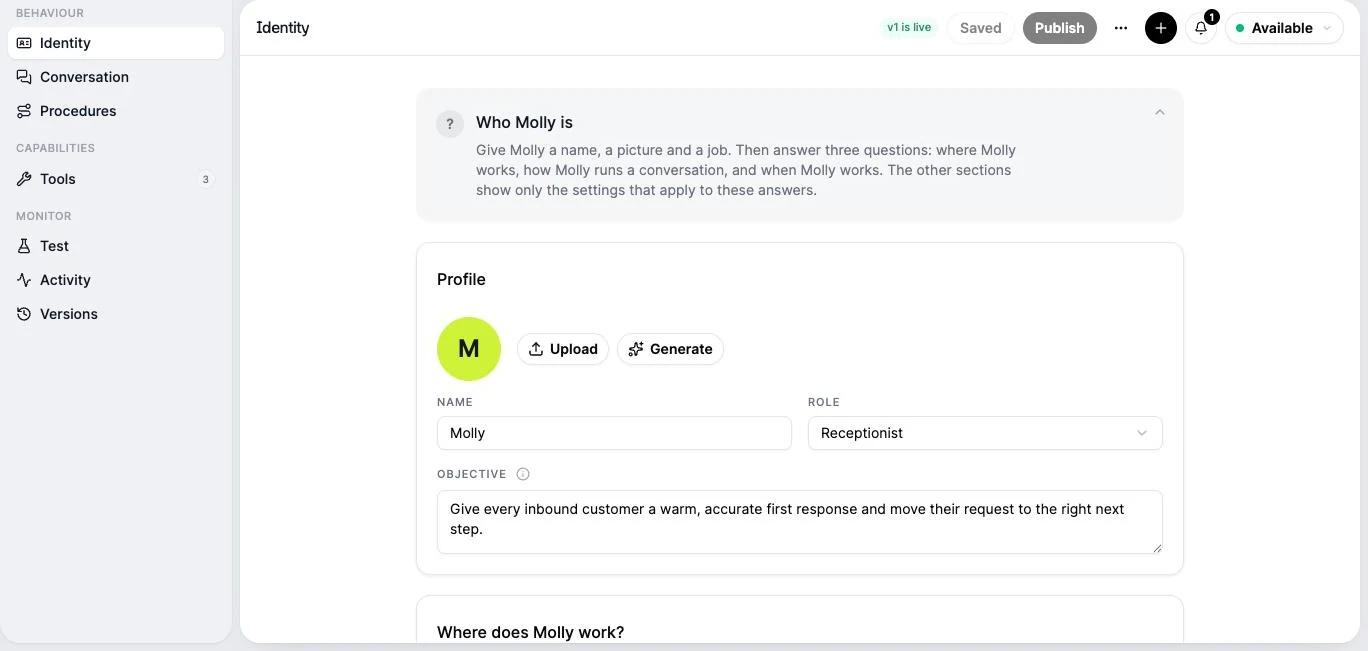
In Line: when you sign up, Line reads your website and drafts the facts for you. Check every line: websites are often out of date on prices and areas. You then keep them as knowledge documents, and choose which ones each receptionist uses in its Conversation section.
Media slot · setup-business-facts · image
Web, /onboarding/setup, Agent step, 1200×750 at 2×. Use a made-up business website. Show the "Here's what we found about your business" table filled in, and tick "Do you want to try out your virtual receptionist now?" so the name field (Molly) and the voice pills (Ellie, Sam, Noor) show.
Media slot · setup-knowledge · image
Web, /agents/[agentId]?section=conversation, 1200×750 at 2×. Scroll to Knowledge, with the scraped "Company profile" and a "Prices and areas" document selected.
Prices: give them, or don't
Decide what the AI may say about money. There are three safe positions:
- Fixed prices for fixed jobs: "A boiler service is £85."
- From prices with a reason: "Rewiring starts at about £3,000 for a two-bed flat. We quote after a visit."
- No prices, with a reason: "Every job is different, so we quote after a short chat. Can I take your details?"
The unsafe position is silence: no prices in the facts and no rule. That is when an AI is most tempted to guess.
Step 3: Connect the systems your receptionist uses
Facts answer questions. Systems let the receptionist act. Make a list of what your receptionist, or you, open during a normal day of calls: the diary, the customer list, the jobs board, the order system, the accounts. Each one you connect is a kind of call the AI can deal with instead of writing down.
There are three ways in:
- Built-in connections. Calendars connect in a few clicks with your Google or Microsoft account.
- MCP. Many business tools now publish an MCP server, an open standard that offers their actions to AI agents. Add the server's address and the receptionist can use its tools: find a customer, check a job, create a booking.
- An API. For a system without an MCP server, add an HTTPS endpoint with a short description of what it does and what it needs. "Get job status by postcode" is a typical first one.
For each action, set the receptionist's authority, the way you would for a new starter:
| Setting | Use it for |
|---|---|
| Run | Lookups and safe changes: check a job, find free slots, add a note |
| Ask first | Changes a person should approve: confirm a booking, issue a credit |
| Draft only | Changes a person should finish: a quote, a refund |
| Off | Anything the receptionist must never do |
Put hard limits, such as a maximum credit, in the system's own rules, not only in the instructions. Keep passwords and keys in the provider's secret store, never in the instructions.
In Line: the receptionist's Tools section holds its calendars, MCP servers, API tools and your published workflows, each with its own setting. Keys are saved encrypted, by name, and are never shown to the AI.
Media slot · agent-tools · image
Web, /agents/[agentId]?section=tools on the agent-infrastructure build, 1200×750 at 2×. Show three tools: Google Calendar (Ask first for bookings), an MCP server for a job-management system (lookup tools on Run), and an HTTPS "Order status" GET tool (Run). One secret listed by name only. No secret values on screen.
Step 4: Write the instructions
The instructions tell the AI receptionist who it is, what it is for, and what to do with each kind of call. Providers call them different things: a prompt, a script, a persona, instructions. They all work the same way.
Start with three lines:
- Name and role: "You are Sam, the virtual receptionist for Hartley Plumbing."
- Objective: "Answer every call, settle simple questions from the facts, and take full details for anything else so the team can call back."
- Voice: pick one that suits your callers, and keep the same one.
Then write a rule for each of your five most common calls, using the call handling rules template. Each rule says what to ask, in what order, and what to promise.
Good and bad instructions
Short, specific rules beat long, general ones. These are the mistakes we see most:
| Instead of | Write |
|---|---|
| "Be helpful and friendly." | "Use the caller's name once you know it. Ask one question at a time." |
| "Answer questions about our services." | "Answer only from the facts sheet. If the answer is not there, say you will check and take their number." |
| "Book appointments." | "Offer the next two free slots. Read the date, time and address back before you finish." |
| "Handle emergencies appropriately." | "If the caller mentions a gas smell, tell them to leave the building and call 0800 111 999, then mark the message URGENT." |
| "Take a message." | "Take name, number, postcode and the reason, in that order. Read the number back." |
| "Don't be pushy." | "Never offer discounts or promise dates. Say [Owner name] will confirm." |
A complete example
Here is a full instruction set for a made-up two-person plumbing business. Use it as a model for your own.
ROLE
You are Sam, the virtual receptionist for Hartley Plumbing, a two-person
plumbing and heating business in Cardiff. You answer calls when Dan and
Rhys are on jobs or the office is closed.

OBJECTIVE
Answer every caller, deal with their request on the call where you can,
and leave Dan only the decisions that need him.

RULES
- Say you are a virtual assistant in the greeting.
- Answer from the FACTS below and your tools. If neither has the
  answer, say: "I'll check that with Dan and get him to call you."
- One question at a time. British English.
- Read every phone number and postcode back to the caller.
- Never promise a date or a price that is not in the FACTS.

CALLS
New job: ask name, number, postcode, what the problem is, and when
suits for a call back. Say Dan calls back today before 6pm.
Existing job: find the job with check_job by name and postcode. Tell
them the date and engineer. To move it, offer free slots from the
calendar and book the new one.
Boiler service booking: offer the next two free Tuesday or Thursday
mornings from the calendar and book the one they choose.
Emergency (gas smell, water pouring, no heating with a baby or elderly
person in the house): gas smell means tell them to leave the building and
call 0800 111 999 now. For the others, mark the message URGENT and say
Dan will call within 30 minutes.
Complaint: listen, say sorry once, and check the job. You may rebook a
return visit free of charge. Anything else, such as money back, goes
to Dan marked URGENT: tell the caller he will call by 6pm.
Sales call: say we're not interested, thank them, end the call.

FACTS
Areas: CF postcodes and NP10, NP18, NP19. No work outside these.
Hours: Mon–Fri 8:00–17:30. Sat 9:00–12:00 emergencies only.
Boiler service: £85, about an hour. Call-out: £60 first hour.
Payment: card or bank transfer on completion.
Gas Safe registered. Guarantee: 12 months on parts and labour.

TOOLS
calendar: find free slots, book and move visits (Run).
check_job: job date, engineer and status by name and postcode (Run).
add_job_note: add a note to a job (Run).
Step 5: Set the handover rules
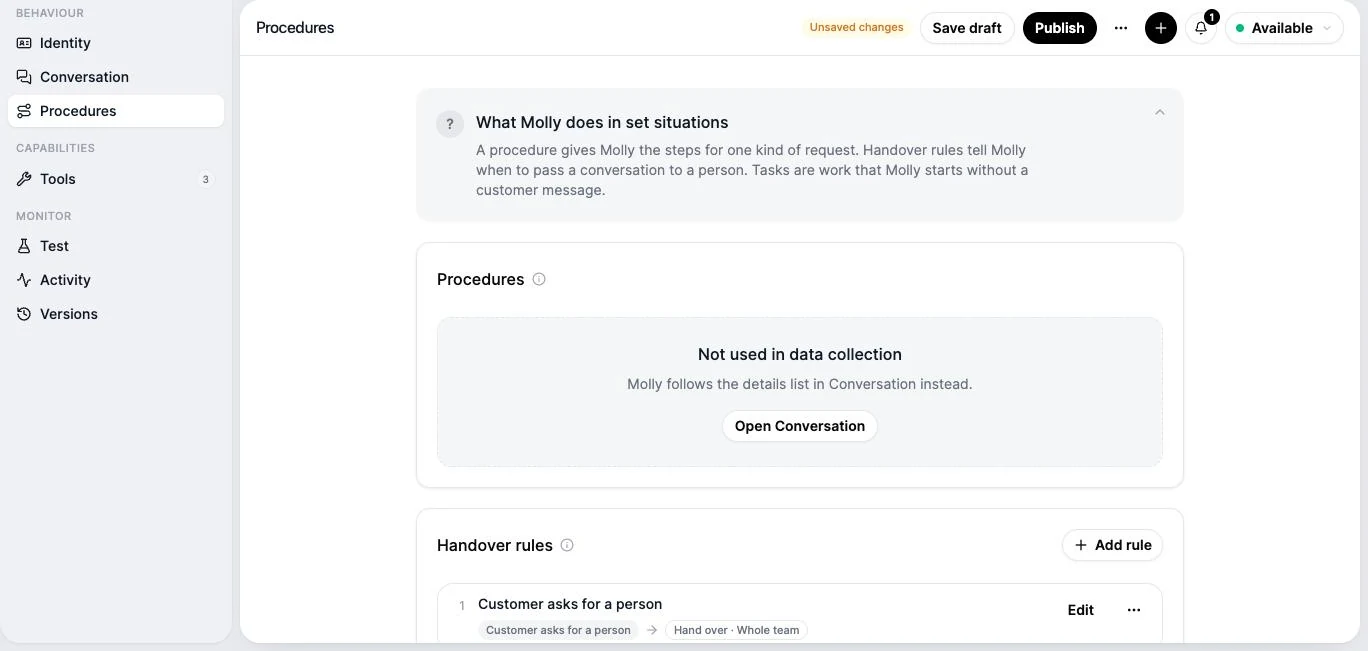
Handover rules decide the moments you want a person, how quickly, and what the caller is told. They are not a list of things the AI cannot handle. An AI receptionist hears an upset caller, follows your complaints policy and puts things right within the authority you gave it in step 3. Handover is for the decisions you keep.
Most businesses set four:
- The caller asks for a person.
- The remedy is beyond its authority, such as money back above your limit.
- The decision is one you keep, such as credit terms, or regulated legal, medical or financial advice.
- Someone is at risk. Tell the caller to ring 999 or the relevant emergency line first, then tell the person on call at once.
For each, set who is told and how: a text, an email, a notification in your app. Then set what the caller hears: "I've marked this urgent for Dan. He'll call you within 30 minutes." Only promise a time your team can keep.
In Line: handover rules sit in the receptionist's Procedures section, next to the step-by-step procedures for set requests. Each rule names when it applies and who takes over.
Step 6: Write the greeting
The greeting is the first thing every caller hears. Keep it under ten seconds. It needs three things: your business name, that the caller is speaking to a virtual assistant, and one open question.
Hello, you're through to Hartley Plumbing. I'm Sam, the virtual assistant. How can I help today?
Say it is an assistant. UK law has no general rule that you must, but the CMA expects businesses not to mislead customers about AI, and the EU requires it for callers in the EU from 2 August 2026. Callers also take it better than you might expect: in a January 2026 survey of 5,001 UK adults, 68% were comfortable with an AI that could hand them to a person (Moneypenny / Censuswide, a vendor study). Our chapter on AI receptionists and UK law has the details and the privacy notice wording.
Standard AI greeting
Any business. Says it is an assistant, then asks one open question.
Hello, you're through to [Business name]. I'm [Assistant name], the virtual assistant. How can I help today?
Trades: owner on a job
Plumbers, electricians, builders. Sets up a quote or a callback.
Hi, thanks for calling [Business name]. [Owner name] is on a job right now, so I'm the assistant answering for the team. Is this about a new job, an emergency, or a job we're already doing for you?
Clinic or salon: bookings first
Dentists, physios, salons, clinics. Most calls are about appointments.
Hello, you've reached [Business name]. I'm the virtual receptionist and I can help with appointments, prices and opening times. What would you like to do?
Professional services
Solicitors, accountants, agencies. Calm and formal.
Good [morning/afternoon], [Business name]. I'm the firm's virtual assistant. Are you an existing client, or are you calling about something new?
After hours
Calls outside opening hours. Sets the callback time at the start.
Hello, you've reached [Business name]. We're closed right now and open again at [time] on [day]. I'm the virtual assistant. I can take your details so the team calls you back first thing, or answer a quick question. What do you need?
Busy lines (overflow)
The team is on other calls. The AI answers instead of a queue.
Thanks for calling [Business name]. Everyone is on another call, so I'm the assistant picking up to save you waiting. Tell me what you need and I'll either sort it now or make sure the right person calls you back.
Media slot · setup-greeting · image
Web, /agents/[agentId]?section=conversation, 1200×750 at 2×. Scroll to the channel greetings. Calls greeting: "Hello, you're through to Hartley Plumbing. I'm Molly, the virtual assistant. How can I help today?"
The greeting generator writes a matching opening line, voicemail and missed-call text for you.
Step 7: Set your hours and who answers when
Your opening hours decide which calls count as after hours. Set them, including Saturday hours and bank holidays, before you decide who answers when.
Media slot · setup-hours · image
Web, /settings?tab=hours, 1200×750 at 2×. Weekly grid: Mon–Fri 08:00–17:30, Sat 09:00–13:00, Sun closed.
Then set the call flow. A typical small business flow:
- In opening hours: ring the team's phones for 20 seconds.
- No answer, or the line is busy: the AI receptionist answers.
- After hours: the AI receptionist answers straight away, with the after-hours greeting.
In Line: each number and channel has a workflow, and its Agent step chooses which receptionist answers. Hours are a rule in the workflow, so changing your opening hours changes the routing without touching anything else. A second number, WhatsApp or web chat can each have a different receptionist.
Media slot · setup-out-of-hours-workflow · video
Landscape, silent, 25 to 30 seconds, MP4 under 6 MB, plus a PNG poster. Record on the agent-infrastructure build. /workflows → New workflow → template "Agent for After-Hour Calls" → Time Rule (Hours set) → In hours: Ring Members (20 s) → no answer: Agent (Molly, Act); Out of hours: Agent (Molly, Act) → Validate → Publish.
Step 8: Test it with 20 calls
Never point your real calls at an AI receptionist you have not rung yourself. Most providers let you test by chat or by a test call before you go live. Do both.
In Line: the set-up includes a chat test with the receptionist, and the Test section of the agent creator runs a test chat on each channel and shows the checks that must pass before you publish.
Media slot · setup-test-chat · image
Web, /onboarding/setup, Test step ("Talk to Molly, right here"), 1200×750 at 2×. A three-turn chat: ask the opening hours, ask a price, ask for something the business does not do. The third answer should show the receptionist saying it will pass the question on rather than guessing.
Work through the test checklist below. For each call, score four things:
| Check | Pass when |
|---|---|
| The answer | It is correct, or the AI says it will check |
| The details | Name, number, postcode and reason are all captured and read back |
| The hand-off | Urgent and person-only calls are marked and reach the right person |
| The feel | Short replies, no talking over the caller, no repeating itself |
20 test calls before you go live
Ring your own number and try each one. Fix the instructions after each failure.
TEST CALLS 1. Ask your opening hours. 2. Ask your address and where to park. 3. Ask the price of your most common service. 4. Ask the price of something you do not offer. 5. Ask to book the next free slot. 6. Ask to cancel a booking. 7. Leave a message for a named person. 8. Give your number fast, then correct one digit. 9. Ask for a person straight away. 10. Describe an emergency. 11. Complain about a past job. 12. Call with loud background noise. 13. Speak with a strong regional accent, or ask a colleague who has one. 14. Interrupt the assistant mid-sentence. 15. Stay silent for ten seconds. 16. Pretend to be a sales call. 17. Ask whether you are talking to a robot. 18. Ask something off topic. 19. Call outside opening hours. 20. Hang up halfway, then check the message still arrived.
Questions to ask any AI receptionist provider
Before you sign up or book a demo.
PROVIDER QUESTIONS 1. Can I keep my existing number? How do calls reach you: forwarding or porting? 2. What does one answered call cost me, including the minutes on my phone line? 3. Is there a monthly minimum, a set-up fee or a contract? 4. How fast does the assistant reply? Can I hear a real call first? 5. Does it understand UK accents, and can it speak with a British voice? 6. What happens when the assistant does not know the answer? 7. How does a person take over: transfer, call back, or a message? 8. How do I get the message: app, text, email? 9. Can it book into my diary, or does it only take booking requests? 10. Can it connect to my other systems (CRM, job, order, booking) through an API or MCP? 11. Can I choose, per action, whether it acts on its own or asks me first? 12. Can it text the caller after the call from my number? 13. Where are recordings and transcripts stored, and for how long? 14. Will you sign a data processing agreement? Is data used to train models? 15. Can I change the instructions myself, and how fast do changes go live? 16. Can I set different behaviour for opening hours and after hours? 17. What reports do I get: answered calls, messages, hand-offs? 18. What happens if your service goes down: where do my calls go? 19. Can I cancel at any time, and can I take my number with me?
Ready-to-launch checklist
Tick each line before you switch an AI receptionist on.
READY TO LAUNCH [ ] Business facts sheet filled in and checked by the owner [ ] Calendar and main systems connected (CRM, job or order system) [ ] Each action set to do it, ask first, draft only or off [ ] Prices and areas match the website [ ] Call handling rules written for your five most common calls [ ] Hand-off rules and urgent contacts set [ ] Messages arrive on the phone of the person who calls back [ ] AI disclosure line in the greeting [ ] Privacy notice updated on the website [ ] 20 test calls done, failures fixed [ ] Forwarding switched on from the existing number [ ] A person checks every AI-answered call for the first week
After each failure, change one thing: a fact, a rule, or the greeting. Then call again. Ask a colleague who has not seen the instructions to try it, because you will unconsciously ask the questions you wrote answers for.
Media slot · setup-preview-publish · video
Landscape, silent, 15 to 20 seconds, MP4 under 5 MB, plus a PNG poster. Record on the agent-infrastructure build. Conversation section → edit the greeting → Test section → send a test message on the Calls channel → publish checks pass → Publish.
Step 9: Go live and watch the first week
Switch on forwarding with the code from step 1, or publish your call flow. Then ring your own number one last time from a phone the AI does not know.
- Inbound call, answered by the AI receptionist19:05 · after hours
Hello, you're through to Hartley Plumbing. I'm the virtual assistant. How can I help?
Molly, AI receptionistMy radiator's cold at the top. Can someone look at it this week?
CallerThat usually means it needs bleeding, which we can do on a visit. What's your postcode?
Molly, AI receptionistCF10 1AB. Thursday morning would be best.
CallerThanks Tom. I've asked Dan to call you back first thing tomorrow to confirm Thursday.
Molly, AI receptionistMessage for Dan, logged with the transcript
Radiator cold at the top · CF10 1AB · prefers Thursday morning
For the first week, read every transcript. It takes ten minutes a day and it is where the real improvements come from. You are looking for four things:
- Questions it could not answer. Add the fact.
- Calls it handled the wrong way. Sharpen the rule.
- Hand-offs that should not have happened, or should have.
- Callers who hung up early. Usually the greeting is too long, or the first question is unclear.
Media slot · setup-mobile-transcript · image
iPhone 15 Pro screenshot (1290×2796). Line app, call detail screen for an AI-answered call, transcript visible. Made-up caller.
After the first week, switch to a weekly check of hand-offs and a sample of other calls. Our main guide lists the five numbers worth tracking each month.
Common problems and how to fix them
| Problem | Likely cause | Fix |
|---|---|---|
| It guesses prices | No price rule, or prices missing from the facts | Add the prices, or a rule that it never quotes |
| Callers talk over it | Replies too long | Add "keep every reply to one or two sentences" |
| Wrong numbers or postcodes | Not reading them back | Add "read every number and postcode back" |
| Says you're open on a bank holiday | Bank holidays missing from the hours | Add them to the hours and the facts |
| Too many hand-offs | Facts too thin, systems not connected, or authority too tight | Read the hand-off transcripts: add the fact, connect the system, or widen the setting |
| It says "I'll check" about orders or jobs | The system that holds them is not connected | Connect it in step 3 |
| Callers hang up at the greeting | Greeting too long or too formal | Cut it to name, assistant, one question |
| Messages miss the reason for the call | No message order | Use the message fields template |
| Sales calls get through as messages | No rule for them | Add a sales-call rule that ends the call politely |
What to do next
- Copy every template at once from the template library.
- Write your voicemail for when everything else fails: business voicemail greetings and receptionist scripts.
- Update your privacy notice: AI receptionists, GDPR and UK law.
- See what an AI receptionist does for your trade on the AI receptionist page, or check pricing.
Frequently asked questions
Ready to get your business number?
Set up in under 3 minutes. No contracts, no hardware, no hassle.
Get a NumberRelated guides
23 min read
7 min read
19 min read